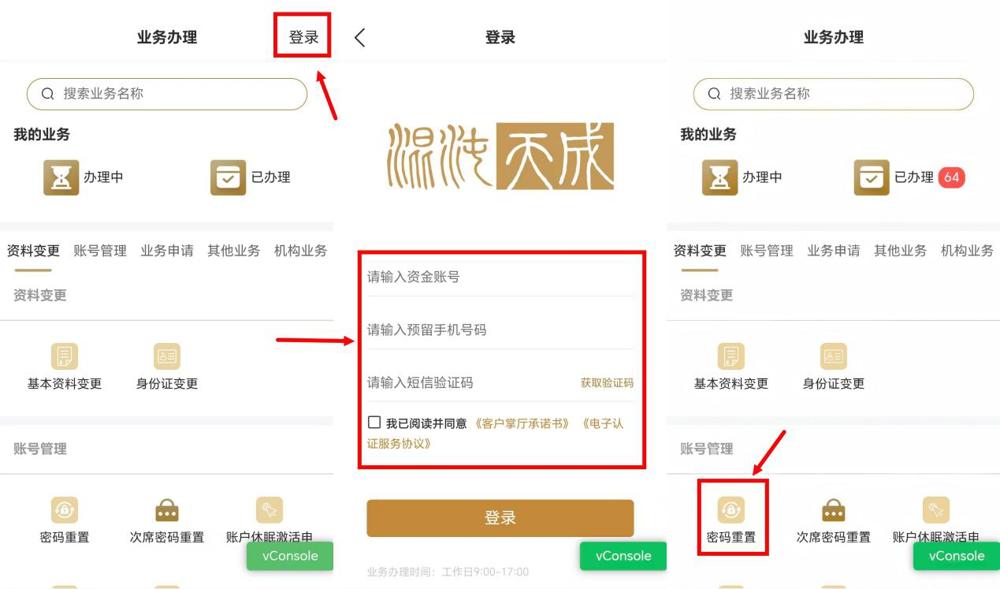
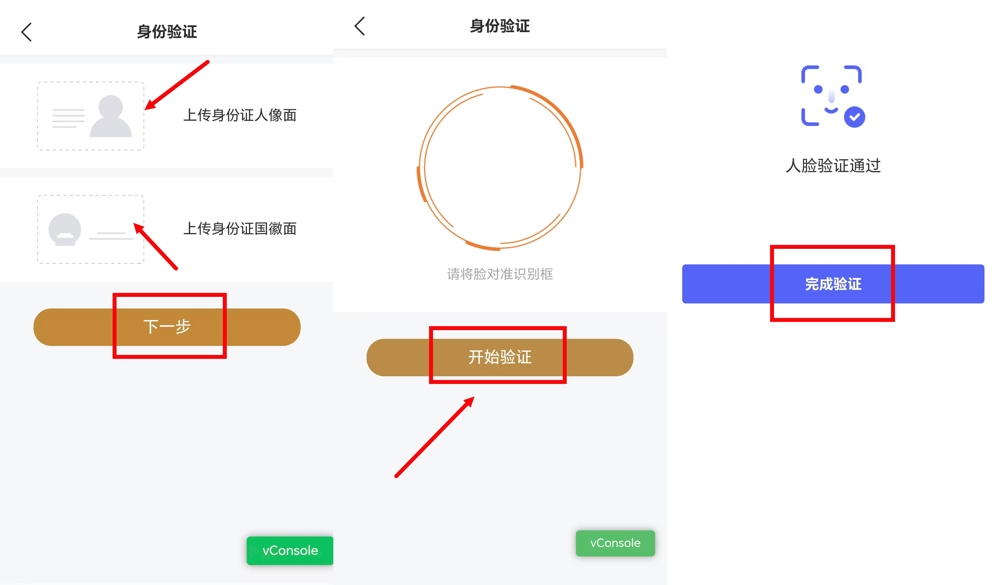
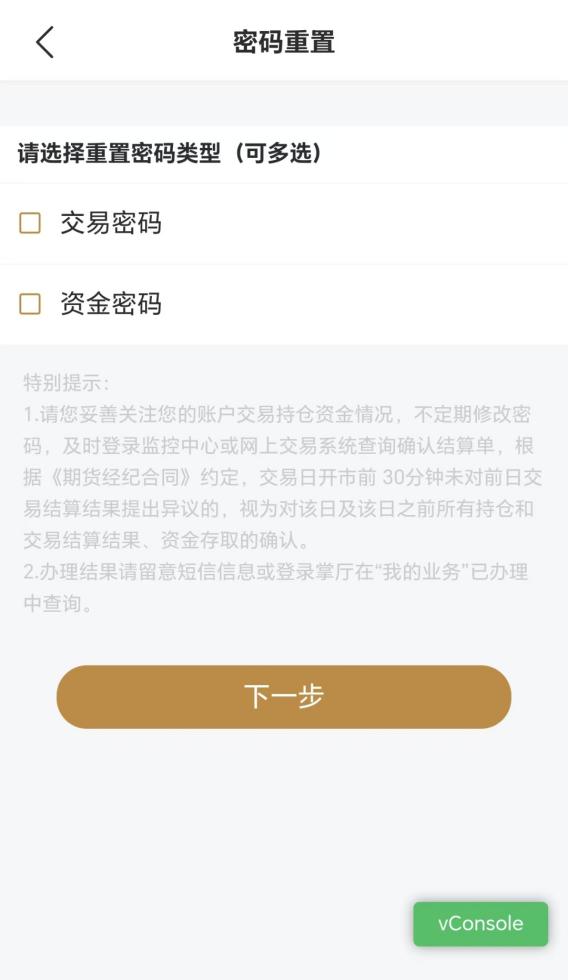
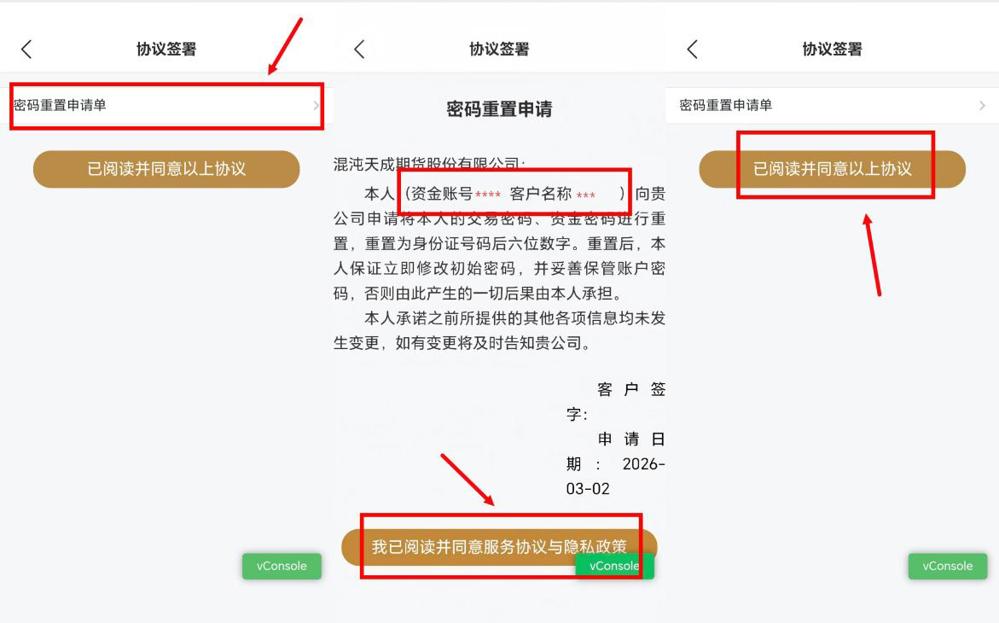
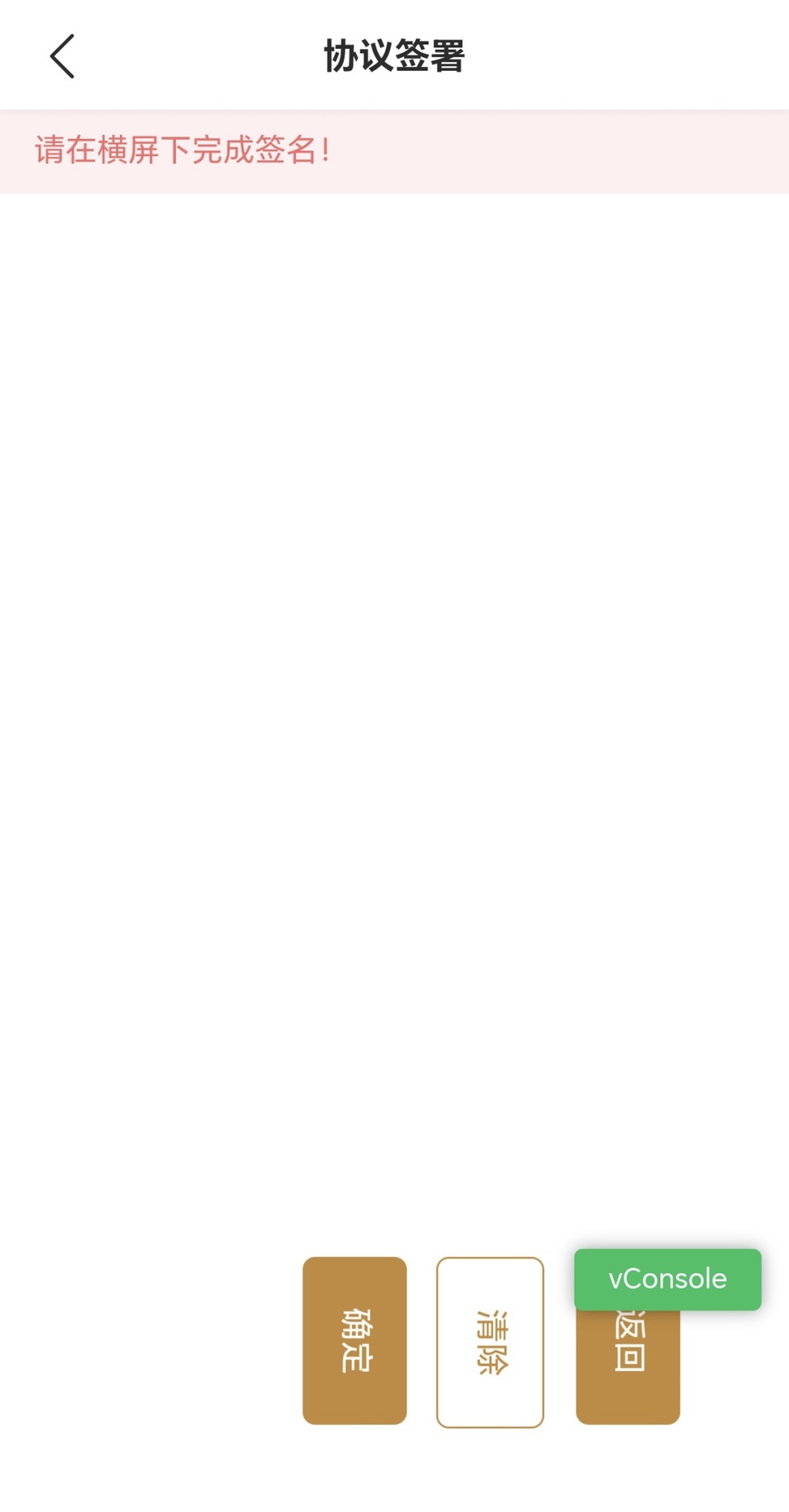
<p style="text-align: left; line-height: 1"><span style="font-weight: bold; text-indent: -21pt; font-size: 15pt; font-family: Wingdings; direction: ltr">l</span><span style="font-weight: bold; text-indent: -21pt; font-size: 15pt; font-family: 仿宋; direction: ltr">登录掌厅,进入业务办理页面,在“账号管理”栏目下,选择“密码重置”功能。</span></p><h1 class="Normal--Web-" style="text-align: left; line-height: 2; direction: ltr" id="h_E1cySW6y"><img src="$/main/contentmanage/article/image/2026/03/12/44c9933402c24ba4a2e9cb6ef58a94b0.jpg" width="554" height="326" alt="44c9933402c24ba4a2e9cb6ef58a94b0.jpg" style="max-width: 99%"><span style="font-size: 15pt; font-family: 仿宋; direction: ltr"> </span></h1><h1 class="Normal--Web-" style="text-align: left; line-height: 2; direction: ltr" id="h_E1cySW6y"><span style="text-indent: -21pt; font-size: 15pt; font-family: Wingdings; direction: ltr">l</span><span style="text-indent: -21pt; font-size: 15pt; font-family: 仿宋; direction: ltr">按提示上传身份证人像面和身份证国徽面照片,点击“下一步”。进行人脸验证:将脸对准识别框,点击“开始验证”,验证通过后点击“完成验证”。</span></h1><h1 class="Normal--Web-" style="text-align: justify; line-height: 2; direction: ltr" id="h_Wx1BOyYE"><img src="$/main/contentmanage/article/image/2026/03/12/9693da8bdb8a4a87843c6a8fe833917a.jpg" width="554" height="324" alt="9693da8bdb8a4a87843c6a8fe833917a.jpg" style="max-width: 99%"><span style="font-size: 15pt; font-family: 仿宋; direction: ltr"> </span></h1><h1 class="Normal--Web-" style="text-align: justify; line-height: 2; direction: ltr" id="h_2i6DiyRH"><span style="font-size: 15pt; font-family: 仿宋; direction: ltr"> </span><span style="text-align: left; text-indent: -21pt; font-size: 15pt; font-family: Wingdings; direction: ltr">l</span><span style="text-align: left; text-indent: -21pt; font-size: 15pt; font-family: "Times New Roman"; direction: ltr"> </span><span style="text-align: left; text-indent: -21pt; font-size: 15pt; font-family: 仿宋; direction: ltr">在密码重置页,勾选需要重置的交易密码“和/或”资金密码,点击“下一步”。</span></h1><h1 class="Normal--Web-" style="text-align: center; line-height: 2; direction: ltr" id="h_wfhBCTty"><img src="$/main/contentmanage/article/image/2026/03/12/ace02b04ddb64763b5e23eae311b050d.jpg" width="248" height="427" alt="ace02b04ddb64763b5e23eae311b050d.jpg" style="max-width: 99%"><span style="font-size: 15pt; font-family: 仿宋; direction: ltr"> </span></h1><h1 class="Normal--Web-" style="text-align: left; line-height: 2; direction: ltr" id="h_HzRYGPY9"><span style="text-indent: -21pt; font-size: 15pt; font-family: Wingdings; direction: ltr">l</span><span style="text-indent: -21pt; font-size: 15pt; font-family: 仿宋; direction: ltr">点击阅读《密码重置申请单》协议内容,确认信息无误,勾选“我已阅读并同意服务协议与隐私政策”,点击“已阅读并同意以上协议”。</span></h1><h1 class="Normal--Web-" style="text-align: center; line-height: 2; direction: ltr" id="h_OlOJ0TT7"><img src="$/main/contentmanage/article/image/2026/03/12/9cc32ba3bd494bd6995a51b4522f34b4.jpg" width="511" height="318" alt="9cc32ba3bd494bd6995a51b4522f34b4.jpg" style="max-width: 99%"><span style="font-size: 15pt; font-family: 仿宋; direction: ltr"> </span></h1><h1 class="Normal--Web-" style="text-align: left; line-height: 2; direction: ltr" id="h_aR5tF360"><span style="text-indent: -21pt; font-size: 15pt; font-family: Wingdings; direction: ltr">l</span><span style="text-indent: -21pt; font-size: 15pt; font-family: 仿宋; direction: ltr">按提示将手机横屏,完成电子签名,点击“确定”提交即可。</span></h1><h1 class="Normal--Web-" style="text-align: center; line-height: 2; direction: ltr" id="h_DHv3jmZB"><img src="$/main/contentmanage/article/image/2026/03/12/9975ea1c8c864e6db7ba4b20bd6a3791.jpg" width="258" height="495" alt="9975ea1c8c864e6db7ba4b20bd6a3791.jpg" style="max-width: 99%"><span style="font-size: 15pt; font-family: 仿宋; direction: ltr"> </span></h1>

.jpg)