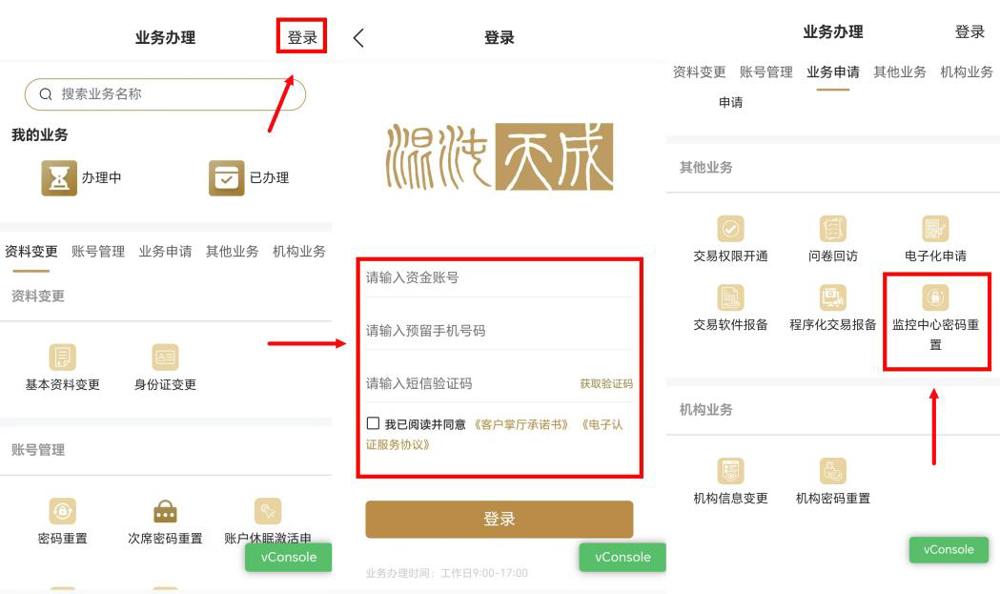
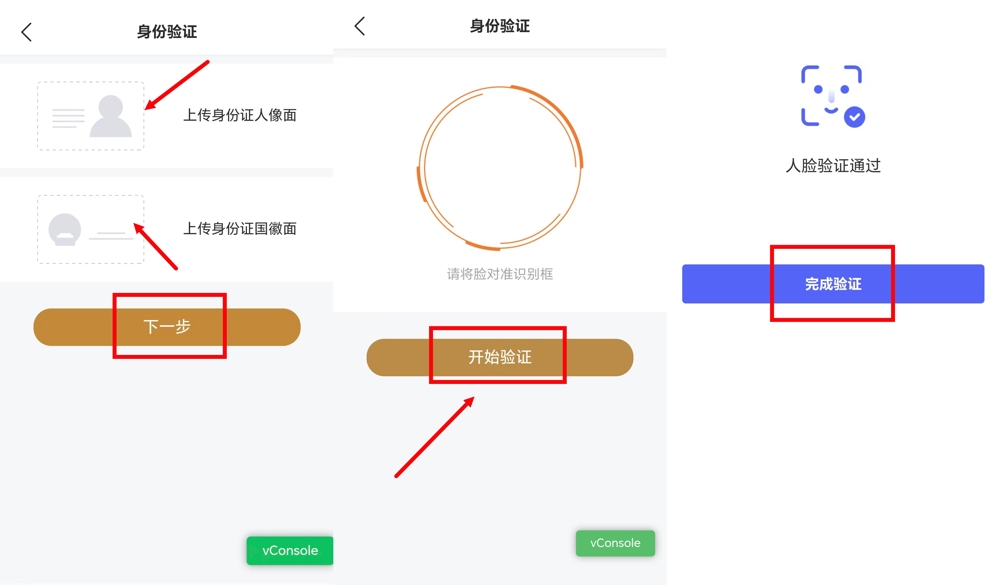
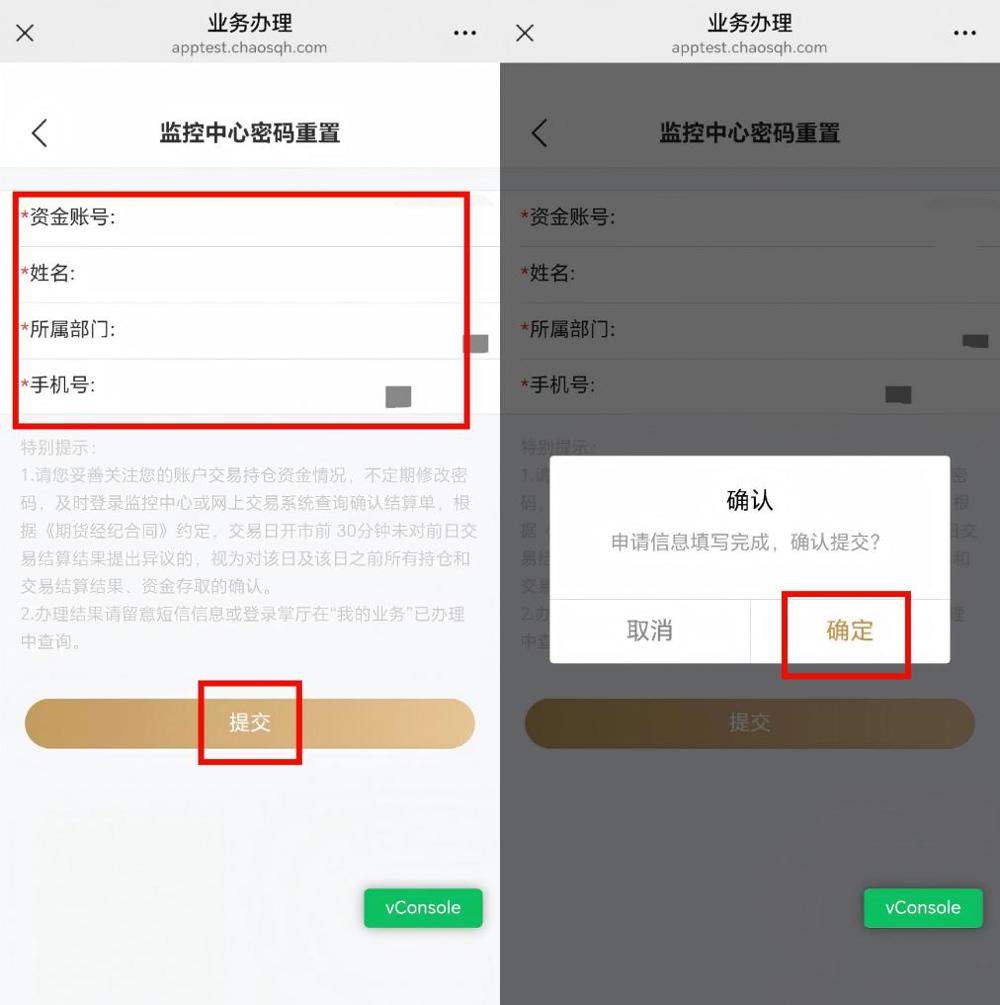
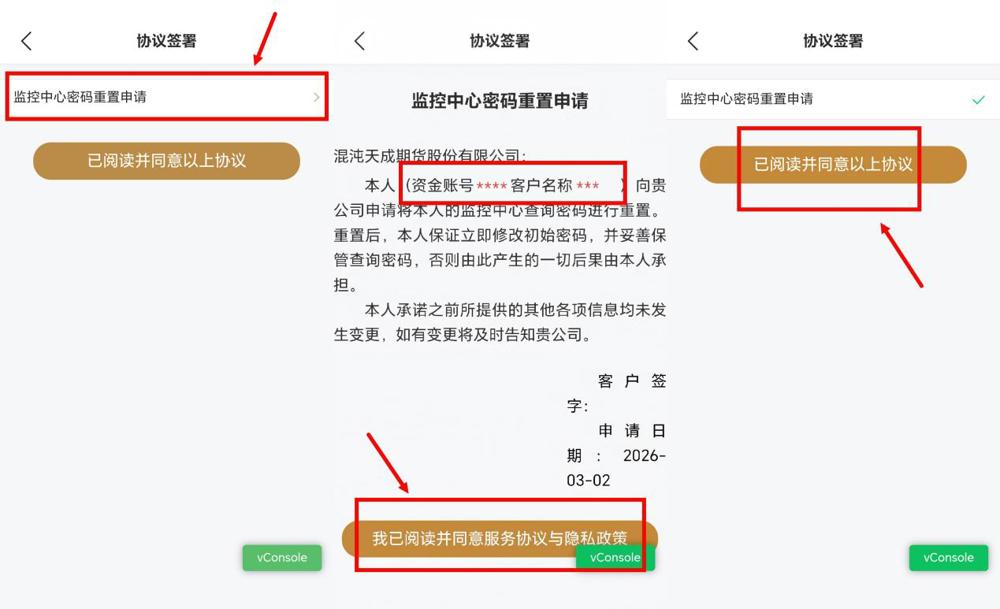
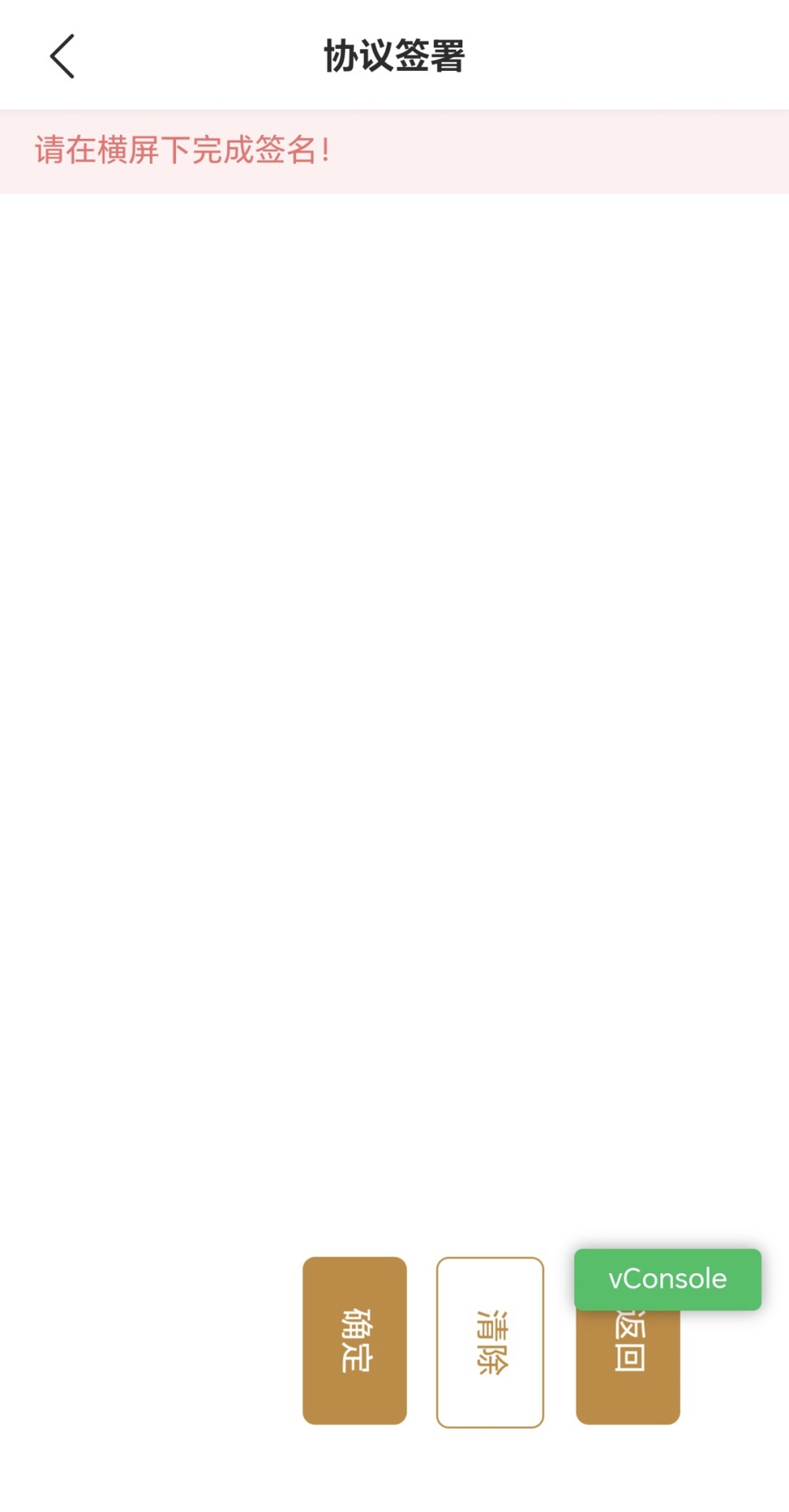
<h1 class="Normal--Web-" style="text-align: left; line-height: 2; margin-left: 21pt; text-indent: -21pt; direction: ltr" id="h_oHDCuyt5"><span style="font-size: 15pt; font-family: Wingdings; direction: ltr">l</span><span style="font-size: 15pt; font-family: 仿宋; direction: ltr">登录掌厅,进入业务办理页面,在“其他业务”栏目中,点击“监控中心密码重置”功能。</span></h1><h1 class="Normal--Web-" style="text-align: center; line-height: 2; direction: ltr" id="h_BGI6OeI6"><img src="$/main/contentmanage/article/image/2026/03/12/313039b4b9544b0aa70a460b3df49439.jpg" width="750" height="446" alt="313039b4b9544b0aa70a460b3df49439.jpg" style="max-width: 99%"><span style="font-size: 15pt; font-family: 仿宋; direction: ltr"> </span></h1><h1 class="Normal--Web-" style="text-align: left; line-height: 2; direction: ltr" id="h_BGI6OeI6"><span style="text-align: left; text-indent: -21pt; font-size: 15pt; font-family: Wingdings; direction: ltr">l</span><span style="text-align: left; text-indent: -21pt; font-size: 15pt; font-family: "Times New Roman"; direction: ltr"> </span><span style="text-align: left; text-indent: -21pt; font-size: 15pt; font-family: 仿宋; direction: ltr">按提示上传身份证人像面和身份证国徽面照片,点击“下一步”。进行人脸验证:将脸对准识别框,点击“开始验证”,验证通过后点击“完成验证”。</span></h1><h1 class="Normal--Web-" style="text-align: center; line-height: 2; direction: ltr" id="h_QsS6fPTW"><img src="$/main/contentmanage/article/image/2026/03/12/6eb1a22e3f284d1c926531812cf3abdf.jpg" width="750" height="439" alt="6eb1a22e3f284d1c926531812cf3abdf.jpg" style="max-width: 99%"><span style="font-size: 15pt; font-family: 仿宋; direction: ltr"> </span></h1><h1 class="Normal--Web-" style="text-align: left; line-height: 2; direction: ltr" id="h_QsS6fPTW"><span style="text-align: left; text-indent: -21pt; font-size: 15pt; font-family: Wingdings; direction: ltr">l</span><span style="text-align: left; text-indent: -21pt; font-size: 15pt; font-family: "Times New Roman"; direction: ltr"> </span><span style="text-align: left; text-indent: -21pt; font-size: 15pt; font-family: 仿宋; direction: ltr">系统自动带出资金账号、姓名、所属部门、手机号等信息,确认无误后点击“提交”。在弹出的确认窗口中,点击“确定”。</span></h1><h1 class="Normal--Web-" style="text-align: center; line-height: 2; direction: ltr" id="h_3QlbhzaR"><img src="$/main/contentmanage/article/image/2026/03/12/13f2568b0518460691a4f3094a759a39.jpg" width="500" height="503" alt="13f2568b0518460691a4f3094a759a39.jpg" style="max-width: 99%"><span style="font-size: 15pt; font-family: 仿宋; direction: ltr"> </span></h1><h1 class="Normal--Web-" style="text-align: left; line-height: 2; direction: ltr" id="h_SPCH9ICL"><span style="text-indent: -21pt; font-size: 15pt; font-family: Wingdings; direction: ltr">l</span><span style="text-indent: -21pt; font-size: 15pt; font-family: 仿宋; direction: ltr">点击阅读《监控中心密码重置申请》协议,确认信息无误,勾选“我已阅读并同意服务协议与隐私政策”,点击“已阅读并同意以上协议”。</span></h1><h1 class="Normal--Web-" style="text-align: center; line-height: 2; direction: ltr" id="h_plhG7M6w"><img src="$/main/contentmanage/article/image/2026/03/12/2ae6ea0b4d8d4a8db914f4cb0e38ddfe.jpg" width="750" height="457" alt="2ae6ea0b4d8d4a8db914f4cb0e38ddfe.jpg" style="max-width: 99%"><span style="font-size: 15pt; font-family: 仿宋; direction: ltr"> </span></h1><h1 class="Normal--Web-" style="text-align: left; line-height: 2; direction: ltr" id="h_plhG7M6w"><span style="text-align: left; text-indent: -21pt; font-size: 15pt; font-family: Wingdings; direction: ltr">l</span><span style="text-align: left; text-indent: -21pt; font-size: 15pt; font-family: 仿宋; direction: ltr">按提示将手机横屏,完成电子签名,点击“确定”提交即可。</span></h1><h1 class="Normal--Web-" style="text-align: center; line-height: 2; direction: ltr" id="h_a1PHyMpb"><img src="$/main/contentmanage/article/image/2026/03/12/3372f163abe140299bd37ad19af8e254.jpg" width="254" height="487" alt="3372f163abe140299bd37ad19af8e254.jpg" style="max-width: 99%"><span style="font-size: 15pt; font-family: 仿宋; direction: ltr"> <br></span></h1>

.jpg)